
FileMaker Jump-Start Solutions – FileMaker Templates
Customizable • Ready to Use • Integratable • eXtendable • Starter Solutions
CRM • Sales • Rental Tracking • Invoicing • Inventory • Employee Evaluation
FileMaker solutions to accelerate development, saving you time, effort, and money.

Robust FileMaker jump-start solutions providing a variety of companies, organizations, and individuals worldwide, quicker development to deployment, and at far less cost.
FileMaker Services
Since 2001 over 2,000 clients have enjoyed working with our talented FileMaker development team!
eXcelisys FileMaker consultants specialize in all aspects of the FileMaker platform, including mobile apps, website and 3rd party integration (Amazon, PayPal, QB). We can eXtend and improve an eXisting FileMaker app or create a shiny new custom FileMaker solution.
We can develop fast and efficient mobile applications so you can do the voodoo you do oh so well remotely. Using FileMaker GO, a free app client from FileMaker®, that runs the FileMaker Pro solutions we create for you on iPads and iPhones.
FileMaker Web Direct is an innovative web technology that instantly runs FileMaker solutions directly in a web browser — no web programming required. Custom Web Apps integrating FileMaker onto the web require coding using PHP with an API-driven approach.
We understand that sometimes you just need a “sounding-board”, an ear to bend, a helping-hand, or a coach to assist you with your FileMaker project. Tap our vast FileMaker eXpertise and knowledge from using it in so many diverse businesses and organizations.
Whether your FileMaker solution was something we developed, or another developer, or even yourself, we can fix, update, upgrade, or eXtend any FMP solution you throw at us, we’re not scared. Our knowledgeable, friendly, and certified eXperts stand ready!
Migrating data (moving it from one like system to another) or converting data (moving data between significantly different systems, can be daunting. Let the eXcelisys team of FileMaker conversion eXperts help. We will do it efficiently and with minimal hiccups.
We often tie FileMaker, WordPress and Mobile solutions together. Other frequest FileMaker integrations include e-mail, calendaring, QuickBooks, PayPal, shipping APIs from FedEx and UPS, Google Maps, phone systems, and a plethora of others…
The eX-Files are a series of jump-start FileMaker® Pro solutions that offer end-users a reasonably complete and functional customizable business application for a fraction of the cost and time for a from-scratch custom solution – enjoy the best of both worlds!
Our contributions to the FileMaker community. Several cool FREE FileMaker downloadable files with instructions, showcasing techniques using the power of the FileMaker platform and how to implement them. And some project bragging.
eXcelisys has crafted amazing FileMaker Pro solutions in almost every industry imaginable: fashion, finance, international publishing, marketing, medical, retail, wholesale, and higher education, just to name a few.
We truly enjoy solving our customers’ software puzzles.
The eX-Files; The Best of Both Worlds
We’ve created the most efficient FileMaker jump-start solution alternatives on the market, these FileMaker starter solutions from eXcelisys are not “products”, nor are they shrink-wrapped, off-the-shelf solutions (although they all can be used “as-is”, but let’s not get ahead of ourselves). The eX-Files are 50-75% completed solutions (YMMV), with the bulk of the nitty gritty and hard foundational development work already completed.
You can complete the remaining 25-50% of the development work on your own or you can bring us in to help you handcraft these FileMaker Pro starter solutions to meet your specific needs and tastes.
 If you choose to retain eXcelisys to complete the remaining work (seems like a great idea to us), you get the best of both worlds: highly efficient, yet tailor-made FileMaker templates that will make your company more profitable, your life easier, and the sun shine brighter on your face. You also get a pretty good discount too!
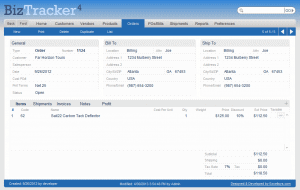
The eX-BizTracker is a FileMaker starter solution geared towards small to medium size businesses and organizations who wish to track clients, invoices, inventory, shipping/receiving, payments, and communications in a robust multi-user scalable solution. Built upon the strong foundation of the original FileMaker Business Tracker developed by eXcelisys for FileMaker, Inc., we have upgraded this CRM and inventory application with dozens of new features, functionality, and enhancements.
The eX-BizTracker has over 100K downloads by users from our website. Nearly 95,000 users have downloaded the FileMaker Business Tracker, and it was one of the most popular free FileMaker templates available for download from FileMaker, Inc. Developers and end-users have found the GUI and feature-set very attractive, as it has offered their clients and employers a jump-start advantage in building intuitive custom solutions.
eX-BizTracker • eX-RentalTracker • eX-TruckingTracker • eX-EvalTracker
FileMaker eXperts

• eXcelisys was an FBA member from 2002 – 2020 • eXcelisys has been a FileMaker certified developer since version 7 •
• Awarded the Claris FileMaker Partners (Platinum) designation from 2014-2019 •
Riveting Reviews Relinquished by Customers
We Love Our Customers, And They Love Us!

Societal Summation of Our Services

Google Reviews & Ratings
4.9 out of 5

BBB Reviews & Ratings
A+

Facebook Reviews & Ratings
4.9 out of 5
Sampling of Satisfied Clientele


























Our Portfolio

FileMaker Quick Quote System Speeds Quotes, Orders
For small manufacturing businesses, creating quotes for custom products can be time-consuming. Check out this quote-automation software we built to help one manufacturer get quotes out quickly.

HOA Website Help
Maintaining an HOA or condo association website takes time and energy. Links break, updates fail and sites get hacked. That's where we can help. See how eXcelisys has assisted two property owner associations in maintaining and updating their sites.

eXcelisys Earns Vote of Confidence for Building Star-Spangled Campaign Website
eXcelisys earns stars and stripes for campaign website design that took 28 days from inception to launch. For St. Joseph County, Indiana, native Tom McCormick, the decision to seek political office was a long time coming. But once McCormick decided to run for county commissioner, he knew he needed to launch a campaign website lickety-split.
Audio Post-production Firm Finds Harmony with Custom Studio Management Software
We heard our client loud & clear -- build us a FileMaker solution to manage bookings, staff schedules, studio space, invoices, project notes, files & more

eXcelisys Delivers New Website for Angery American
A while back, Chris Weatherman – famed prepper, survivalist, podcaster and contestant on the History Channel’s first season of “Alone” – found himself alone, once again. The backdrop of his isolation this time was not Vancouver Island, but the wilderness of web development. Weatherman – best known as the “Angery American” and author of the best-selling “Survivalist” book series – could not find a website developer willing to touch his website.

NotarizeIt! Gives eXcelisys Stamp of Approval for Website Development Work
Frustrations with another developer led NotarizeIt! to enlist the services of eXcelisys to save its development project and get its site up, running, and launched for action! NotarizeIt! offers an online directory to link notaries with clients in need.